
This feature allows you to create a zip file from a selected date and through a selected date. The date range is limited to 92 days. The oldest date can be Oct 1, 2010 and the most current date is “today”. The default date range is 30 days.
For example: From Date 10-01-2010 through date 12-31-2010.
1. Select a Date Range from date and through date Click Apply or Clear to change dates.
2. Click Create Zip File. When clicking the Create Zip File button, the system will default to zip ready status. Select from the following choices to include in the zip file. Select all that apply.
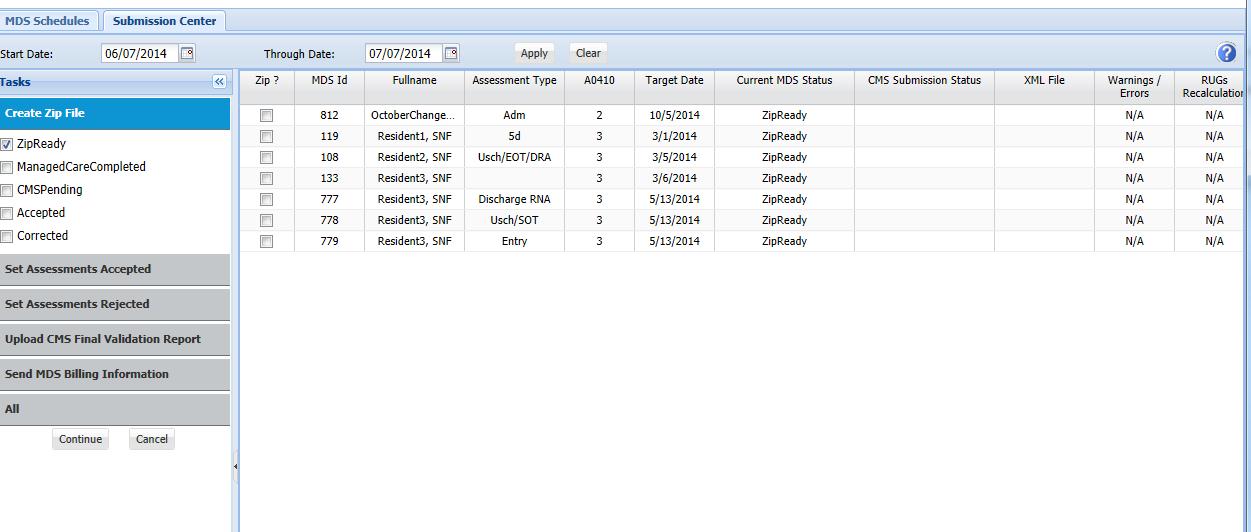
3. Choose assessments to add to the Zip File by checking the box to the left you may choose all that apply.
4. Click Continue to create the Zip File or Cancel to return to the Submission Center.
Note: Assessments with a working copy cannot be added to the zip file until the working copy is committed. Go to the assessment and commit the working copy or call client care if assessments with a working copy are identified.